



The review standard can matter more than the size of the file. Under de novo review, a court considers the legal issue anew. Under substantial evidence review, it asks whether the record supports the decision being challenged. That distinction is central to navigating legal and security reviews fast...
The review standard can matter more than the size of the file. Under de novo review, a court considers the legal issue anew. Under substantial evidence review, it asks whether the record supports the decision being challenged. That distinction is central to navigating legal and security reviews faster: each standard points to a different question and a different kind of evidence.
A thicker submission or longer explanation won’t necessarily move a review along. Volume isn’t the same as relevance. First identify what the reviewer must decide, then make the supporting record clear and focused.
This article explains de novo and substantial evidence review, how those standards shape the assessment of a decision, and why the distinction matters when teams prepare for scrutiny. It also shows how a clear decision framework can keep legal and security reviews focused on the issue at hand, rather than bogged down in material that doesn’t answer it.
• Match the documents you prepare to the issue under review, and make the supporting record easy to follow.
• Streamline vendor security questionnaires by keeping responses consistent and organizing the evidence reviewers need.
• Compare automation tools by how they support your review workflow, not simply by the number of tasks they can automate.
• Review standards shape what decision-makers assess, while clear deal guidance can help sales teams handle review-related questions more consistently.
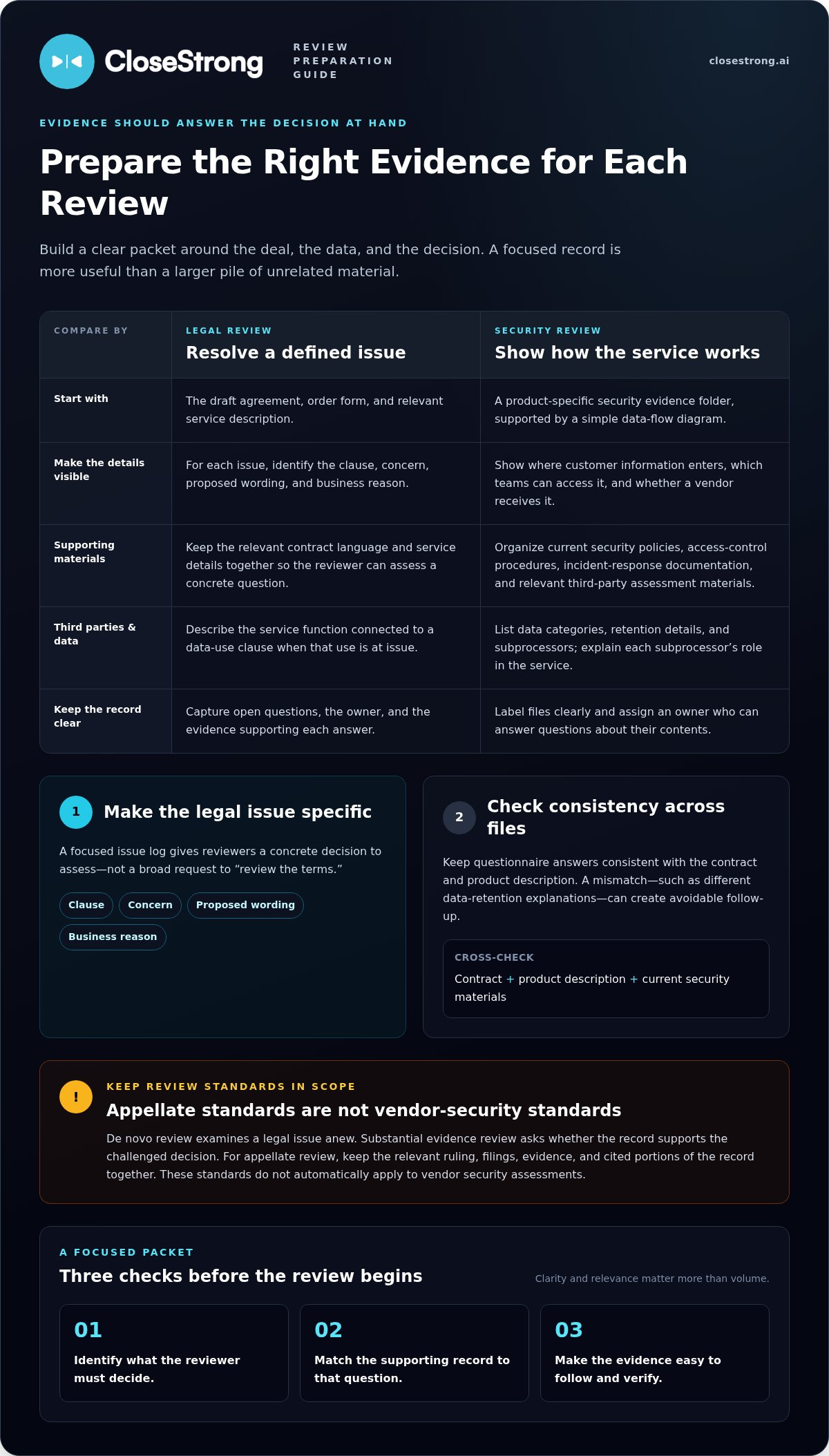
Start with documents that explain the deal, the data, and the decisions involved. Gather the draft agreement, order form, product description, and a simple data-flow diagram. The agreement shows the proposed obligations; the diagram shows how information moves between systems. Identify where customer information enters, which teams can access it, and whether a vendor receives it. Label each file clearly and assign an owner who can answer questions about its contents.
Build a security evidence folder around the specific product and service under review. Include current security policies, access-control procedures, incident-response documentation, and relevant third-party assessment materials. For instance, independent evaluations from security specialists like CyberOne can help substantiate environment configurations and baseline controls. List subprocessors and describe their roles if they handle information. Keep the answers consistent with the contract and product description. A mismatch, such as different data-retention explanations in two documents, creates avoidable follow-up.
Include the draft contract, order form, and any relevant service description.
Provide a data-flow diagram, data categories, and retention details.
Organize policies, access-control procedures, and incident response documentation.
List subprocessors and explain their role in the service.
Capture open questions, the owner, and the evidence supporting each answer.
For legal review, prepare a short issue log alongside the contract. For each issue, state the clause, concern, proposed wording, and business reason. For example, flag a data-use clause and specify which service function requires that use. This gives reviewers a concrete decision to assess instead of a broad request to “review the terms.”
Different kinds of reviews may call for different supporting materials. De novo review examines a legal issue anew, while substantial evidence review focuses on support in the record. Keep the relevant ruling, filings, evidence, and cited portions of the record together. The standard shapes what matters: a legal argument needs the governing materials, while an evidence challenge needs a traceable record. These distinctions apply to appellate review, not automatically to vendor security assessments.
Treat each questionnaire as a repeatable process, not a fresh writing assignment. Assign one owner to coordinate answers and route questions to the people responsible for security, legal, product, and operations. The owner tracks unanswered items, conflicting responses, and evidence needs. Clear ownership prevents the same question from circulating without a decision.
Build a controlled answer library for recurring topics such as access management, data handling, incident response, and subcontractors. Store each approved response alongside its supporting evidence and review date. Keep answers specific to the question. If a buyer asks where data is stored, a broad statement about security controls won’t answer it.
Mark whether it concerns security, privacy, legal terms, or product behavior.
Reuse current language for repeated questions, then tailor it to the vendor and service.
Link each response to the document or record that supports it.
Send novel or unclear questions to the subject-matter owner instead of guessing.
Record who approved an answer and update it when the underlying practice changes.
Automation can help organize question assignments, reusable responses, and status tracking. It can’t make an inaccurate answer safe. Before submitting, compare the completed questionnaire with the contract, product description, and current security materials. If an answer describes a retention period, for example, confirm that the same practice appears in the relevant documentation. Flag any mismatch for resolution rather than smoothing it over.
Close the loop with a concise exception log. For each unanswered or qualified response, record the question, owner, evidence needed, and next decision. This gives reviewers a clear path through open issues. For teams handling review questions during active sales discussions, consistent deal guidance can help keep responses aligned with the deal’s needs.
Security review automation comes in several forms, each addressing a different bottleneck. Questionnaire tools organize incoming requests and reuse approved answers. Evidence platforms collect security materials and connect them to control requirements. Governance, risk, and compliance systems track risks, policies, and remediation work. Document assistants help search or draft responses from approved materials. Compare tools based on the task slowing your review, not a feature checklist.
A questionnaire tool suits teams answering repeated buyer requests. It can centralize question libraries, route unusual items to owners, and track completion. An evidence platform suits teams that repeatedly locate supporting records, associating a control with its policy, assessment, or other evidence. A broader governance platform may suit organizations coordinating security risks and internal controls across teams. These categories overlap, but they don’t solve identical problems.
Compare reusable answers, assignment workflows, and exception tracking.
Assess how easily reviewers can find supporting records and see their context.
Look at risk ownership, policy workflows, and remediation tracking.
Evaluate whether generated responses stay grounded in approved source material.
Test a tool against a real review scenario. Give it a vendor questionnaire with a data-retention question, an unfamiliar control, and a request for supporting evidence. Check whether it reuses an approved response, flags the unfamiliar item for human review, and surfaces the relevant record. A fast draft that hides uncertainty creates cleanup, not speed.
Compare tools by fit, control, and handoffs. Ask whether the platform supports your existing process, preserves clear ownership, and lets reviewers trace answers to evidence. Examine how teams correct outdated responses and handle exceptions. Automation should reduce repetitive work while leaving judgment with the people responsible for the answer. Choose the tool that resolves your documented bottleneck, not the one with the longest feature list.
The study found that laypeople may rely on legal information from another jurisdiction when it is easy to use, even though it may not apply where they live.
There’s no single timeline for every legal or security review. Duration depends on the work involved: a standard agreement with clear answers moves differently from a deal with unresolved terms, unfamiliar data use, or several review teams. A contract question about liability may need legal analysis, while a data-access question may require security and product input. Each handoff is another point where the review can stall.
Separate the review into stages before estimating its path. Identify intake, security assessment, legal review, issue resolution, and final approval, then map dependencies. If legal needs the security team’s description of data handling, that answer must come first. If both teams can review separate issues at the same time, parallel work can reduce idle time. The sequence matters as much as the number of questions.
A narrow product review differs from one involving multiple services or data flows.
Missing answers or evidence trigger follow-up and restart review work.
Negotiated contract language or unusual security controls need focused decisions.
Unassigned questions sit until someone takes responsibility and responds.
Each required reviewer or decision-maker adds a handoff to track.
Use those factors to forecast the work, not to promise a universal deadline. For a straightforward vendor assessment, record the remaining questions, owners, dependencies, and approval steps. For a contract with open data-use language, track that issue separately from routine questionnaire answers. This gives stakeholders a working estimate based on actual blockers and shows what needs to happen next.
Review standards also shape legal work. De novo review examines a legal issue anew; substantial evidence review asks whether the record supports the decision. These standards concern appellate review, not ordinary vendor approval. Keep the terms distinct so teams don’t confuse a court’s review of a decision with an organization’s contract or security process.
For sales teams coordinating deal questions across stakeholders, align deal guidance with review steps so ownership and next actions stay visible.
CloseStrong helps sales teams put company strategy into practice on active deals through its Enterprise Sales Execution Platform. Legal and security reviews can introduce complex questions into a sales process. Precision Guided Selling™ guides representatives through the closing process, while custom, high-quality deal guidance helps them respond with a clearer view of each deal’s needs.
Turn to CloseStrong when review-related questions make it harder for sales representatives to keep deal actions aligned with company strategy. The platform supports deal execution; it isn’t a substitute for legal counsel or a security assessment. A practical next step is to connect review considerations to the decisions sales teams make throughout each deal.
To discuss how CloseStrong can support your sales execution, contact CloseStrong or visit closestrong.ai.
Make the next review an input to deal planning, not a surprise at the finish line. Set a shared checkpoint where sales teams identify required approvals, decision owners, and issues that could affect the buyer’s path. That turns review readiness into an operating habit instead of a last-minute scramble.
Know what the review criteria mean for the deal, then make that clear to everyone involved. Legal judgment belongs with legal reviewers; security evidence still requires accurate, accountable answers. Sales teams can keep the process moving by surfacing dependencies early and aligning next steps with company strategy. That’s the practical advantage of navigating legal and security reviews faster: fewer avoidable surprises and clearer decisions at each stage.
If you’re ready to connect review-related deal challenges with stronger sales execution, contact CloseStrong to discuss your needs. Take the next step with a clearer plan for your team’s deals.
A reliable approach to navigating legal and security reviews faster starts with agreeing on scope, decision criteria, and escalation owners before work begins. For example, decide whether a product configuration change reopens the full security review or triggers only a targeted assessment. Keep a decision log with the issue, decision-maker, rationale, and follow-up. This prevents settled points from being debated again and gives incoming reviewers useful context.
Scope changes, late-arriving decision-makers, and reopened issues can slow the process. These are common obstacles when navigating legal and security reviews faster. Adding an integration after a review begins, for example, can change the data flow and prompt further assessment. Legal and security teams may also have different assumptions about the transaction. Record decisions and flag material deal changes promptly so reviewers can focus on what has actually changed.


