




What good is a live deal dashboard if it still leaves the rep asking, “What should I do next?” Real-time deal guidance should do more than surface activity. It should connect a meaningful change in an active opportunity to a clear, relevant sales action while there’s still time to act. Deal risks of...
What good is a live deal dashboard if it still leaves the rep asking, “What should I do next?” Real-time deal guidance should do more than surface activity. It should connect a meaningful change in an active opportunity to a clear, relevant sales action while there’s still time to act.
Deal risks often become obvious during a review, after a buyer has gone quiet, a key stakeholder has gone missing, or the timeline has slipped. Reps may already have playbooks and plenty of information. The gap is knowing which signal matters now and what to do about it. More visibility isn’t the same as better execution.
This article explains what real-time deal guidance means, how to spot signals that deserve timely attention, and how to distinguish actionable support from another dashboard. You’ll also learn what to examine in an approach that connects company strategy to rep actions on complex opportunities. CloseStrong’s Precision Guided Selling™ is designed to address that strategy-to-execution challenge. When evaluating any claim of live guidance, check what the platform actually does. The test is simple: does the guidance clarify a next move, or just add more data to the screen?
• Separate useful, deal-specific direction from dashboards, static playbooks, generic alerts, and retrospective reviews.
• Use real-time deal guidance to connect relevant opportunity signals with a clear next action, not just fresher data.
• Compare CRM record-keeping, revenue intelligence, alerts, and contextual guidance by their purpose and the action each supports.
• Start adoption with one recurring deal decision, then assess whether the guidance helps reps act without adding noise.
• Evaluate how CloseStrong’s Precision Guided Selling™ and custom deal guidance connect company strategy with individual deal execution.
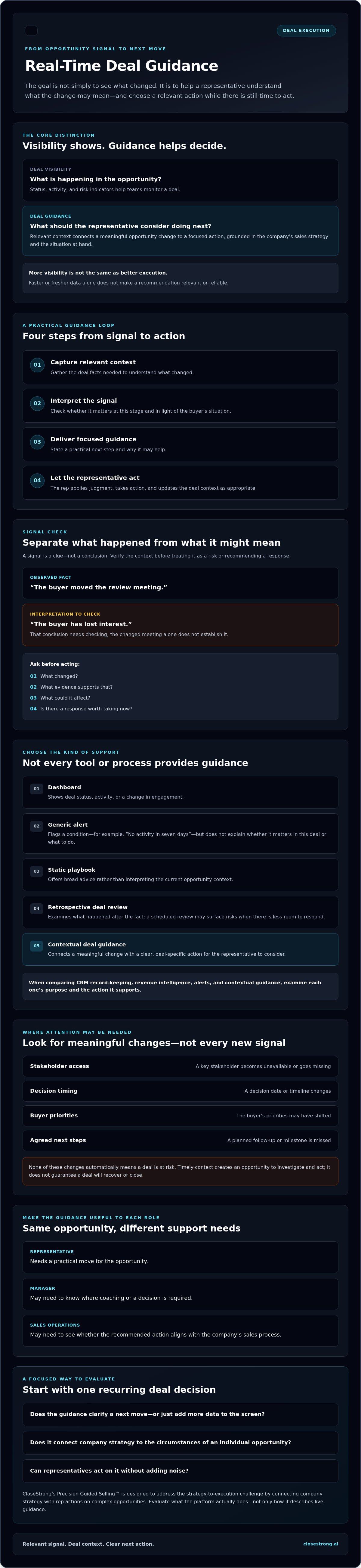
Real-time deal guidance is timely, deal-specific direction that helps a sales representative choose an appropriate next action. It connects what’s happening in an opportunity with what the rep should consider doing, based on the company’s sales strategy and the situation at hand.
Deal visibility shows what’s happening; deal guidance interprets the context and recommends what the rep should consider doing next. A dashboard might show that buyer engagement has dropped. A generic alert might flag a missed milestone. A static playbook offers broad advice, while a retrospective deal review examines what happened after the fact. Useful guidance goes further: it helps a rep decide whether the change calls for a follow-up, a conversation with another stakeholder, or a different approach. Faster data alone doesn’t make a recommendation relevant or reliable.
Visibility helps teams monitor deal status, activity, and risk indicators. Guidance helps a representative make sense of those details in context. That distinction reflects the broader idea behind a Decision support system (DSS): supporting decisions as circumstances change, rather than simply displaying information.
Hypothetical example: A dashboard shows that an opportunity’s decision date has moved and the executive sponsor hasn’t attended recent meetings. Those facts create visibility. Guidance would help the rep consider whether to confirm the decision process, identify who is now involved, or revisit value priorities before the next conversation. The right action depends on the deal context, not one isolated data point.
That’s also why a rule-based alert isn’t automatically guidance. “No activity in seven days” identifies a condition. It doesn’t explain whether the pause is a risk, a normal buying-cycle gap, or a sign that the rep should take a particular step.
Live opportunities move. A stakeholder may leave, a decision may stall, or a buyer’s priorities may shift. If those changes surface only in a scheduled review, the rep may have less room to respond. Timely context creates an opportunity to investigate and act; it doesn’t guarantee a deal will recover or close.
The goal isn’t to react to every new signal. It’s to help reps recognize which changes matter, then apply company strategy consistently to individual opportunities. That requires guidance grounded in the deal’s circumstances and clear about the decision it supports. Otherwise, teams get more noise, not better execution.
A signal is just a clue. It becomes useful when someone checks what it means for the opportunity and decides what to do. A practical flow has four steps:
Gather the deal facts needed to understand a change.
Check whether it matters at this stage and in light of the buyer’s situation.
State a focused next step and why it may help.
The representative applies judgment, takes action, and updates the deal context as appropriate.
Fresh data isn’t automatically good data. A newly recorded meeting date may be accurate but unimportant; a delayed update may make a real change look stale. Before acting, distinguish what’s observed from what’s inferred. “The buyer moved the review meeting” is an observation. “The buyer has lost interest” is an interpretation that needs checking.
Good guidance also fits the user. A representative needs a practical move for the opportunity. A manager may need to know where coaching or a decision is required. Sales operations may need to see whether the recommended action aligns with the company’s sales process. AI for sales can support analysis and decision-making, but technology alone can’t make a weak signal relevant. The context and intended action still matter.
Consider changes in stakeholder access, decision timing, buyer priorities, or agreed next steps. None automatically means a deal is at risk. Ask: What changed? What evidence supports that? What could it affect? Is there a response worth taking now?
For example, a buyer missing an agreed follow-up is a fact. Assuming the buyer has disengaged is not. A useful process prompts the rep to verify the reason and choose an appropriate response, rather than treating every missed step as a crisis. These are illustrative signals, not claims about any particular platform’s data inputs.
Anchor the recommendation in the deal stage, company strategy, buyer context, and user’s role. “Review the opportunity” is vague. “Confirm who owns the next decision before updating the close plan” gives the rep a task and a reason to do it.
That’s the standard for real-time deal guidance: a signal becomes guidance only when it’s tied to deal context and an actionable response. If you’re evaluating how custom deal guidance could connect company strategy to actions on active opportunities, explore CloseStrong’s approach. Verify specific claims about data inputs, generated recommendations, integrations, or delivery timing before relying on them.
These tools may work alongside each other, but they answer different questions. A CRM records deal information. Revenue intelligence helps teams examine deal and pipeline signals. An alert flags a condition. Contextual guidance connects the situation to a possible next action. Treating them as interchangeable creates clutter, not clarity.
| Tool | Purpose | Typical output | Timing | User’s next action |
|---|---|---|---|---|
| CRM | Maintain deal and customer records | Opportunity fields, notes, and activity history | Updated as information is entered or captured | Review or update the record |
| Revenue intelligence | Analyze sales activity and pipeline performance | Trends, risk indicators, and forecasts | Often used for ongoing analysis and reviews | Investigate patterns or adjust priorities |
| Rule-based alert | Flag a defined condition | A notification, such as a missed milestone | When a specified rule is met | Check whether the alert needs a response |
| Contextual deal guidance | Support a decision on a specific opportunity | A relevant next step with a rationale | When the relevant deal context is available | Assess and act on the recommendation |
Actual capabilities and timing vary by system. A data-driven sales strategy can help teams use interaction information to better understand customer needs, but data still needs interpretation before it becomes a useful action.
An alert can tell a rep that a decision date changed. It may not explain whether the change reflects a buyer-side delay, a revised internal plan, or a routine adjustment. Without deal context, priority, and clear ownership, repeated notifications can become noise. Not every alert deserves intervention or manager escalation. The rep should first assess what changed and whether a response is warranted.
Think of the CRM as a system of record and revenue intelligence as a way to understand broader activity and pipeline patterns. Guidance can sit alongside those capabilities, connecting company strategy to a potential action on an individual deal. It shouldn’t be assumed to replace record-keeping or analytics. Confirm how any platform uses deal context and delivers recommendations before relying on specific capabilities.
For the broader strategy-to-execution context, see this overview of the enterprise sales execution platform. CloseStrong positions its approach around Precision Guided Selling™; learn more about the related Precision Guided Selling software methodology.
Don’t try to guide every sales activity at once. Start with one recurring, strategically important deal moment where representatives need to make a clear decision. Then test whether the guidance helps them take an appropriate action. A focused rollout makes it easier to spot noise, weak assumptions, and missing ownership before they spread across the sales process.
Use this four-step framework:
Pick a recurring point in a sales motion where timely action matters, such as confirming the decision process after a buyer changes the target date.
State what the representative needs to decide, what context matters, and what action is reasonable. Identify the source of each signal and who owns the response.
Make the recommendation specific to the deal and company strategy. Include a rationale, not just a risk label or reminder.
Check whether reps saw, understood, and acted on the guidance. Refine or remove prompts that lack relevance or a clear owner.
Choose a decision that comes up often enough to evaluate and matters enough to the sales strategy. Define the minimum context required to make a sound recommendation, then ask whether the rep can take a practical next step. If a signal has no credible source, response, or accountable owner, leave it out. More indicators won’t fix a vague decision.
A deal health score may flag concern, but it doesn’t tell a rep what to do. That distinction is explored in this guide to sales deal health software. Treat indicators as prompts to assess context, not commands to intervene or escalate.
Start with process evidence. Where available, review whether representatives saw the guidance, understood it, and completed the suggested action. Check whether those actions align with the intended sales process. These measures help leaders identify friction; they don’t prove that guidance caused a revenue result.
Ask reps and managers whether recommendations arrive at a useful moment, fit the deal, and interrupt work unnecessarily. Separate adoption and process consistency from business outcomes such as win rates. Other factors affect results, so don’t claim causation without evidence.
Use the findings to sharpen the use case before expanding it. If you’re assessing how custom deal guidance could connect company strategy with actions on active opportunities, explore CloseStrong’s deal guidance approach.
A sales strategy only matters if it shapes decisions on active opportunities. That’s the execution challenge CloseStrong addresses: helping representatives follow company strategy on individual deals through custom, high-quality deal guidance. Its offering is an enterprise sales execution platform, not CRM software or a sales training workshop.
That positioning is relevant when evaluating real-time deal guidance, but don’t mistake the goal for proof of a specific capability. CloseStrong’s platform is designed to support the strategy-to-execution challenge. The details of how quickly guidance appears, which data sources inform it, and how it’s delivered should be confirmed before assuming they fit your sales workflow.
CloseStrong’s stated purpose is to bridge company strategy and individual deal execution. Its proprietary Precision Guided Selling™ technology is intended to help representatives apply that strategy to specific opportunities, supported by custom, high-quality deal guidance. The emphasis is on execution: not just making deal activity visible, but helping connect the company’s approach with what reps do on individual deals.
That distinction matters. A strategy can be clear in leadership materials yet hard to apply consistently across complex opportunities. The relevant evaluation question is whether guidance reflects your sales strategy and helps clarify a suitable action in context. Don’t assume that the platform automatically analyzes deal changes, integrates with a particular CRM, or delivers recommendations instantly unless those capabilities are confirmed.
Keep the evaluation grounded in your sales motion. Ask how custom guidance is shaped by your company’s strategy and the context of an individual deal. Then confirm the operational details rather than relying on a broad “real-time” label.
How is guidance adapted to your sales strategy, deal stages, and opportunity context?
Which data sources and CRM connections are supported? What information is required, and how is it kept relevant?
Where and when does guidance appear in the representative’s work? Confirm the timing and delivery mechanisms.
How can your team assess whether recommendations are relevant, adopted, and aligned with sales execution priorities?
Look for clear answers, not feature labels. A platform may show activity or flag a change without telling a rep how that signal connects to company strategy. Custom guidance is only useful if representatives can understand it, judge it against the deal, and act appropriately. Treat those as points to validate, not outcomes to assume.
If the strategy-to-action gap is a priority for your team, explore CloseStrong’s enterprise sales execution platform and assess how its stated approach fits your requirements. Verify real-time delivery, integrations, and other workflow details directly before making a decision.
More data won’t close the gap between strategy and execution. Useful real-time deal guidance connects relevant opportunity context to a practical next action, while leaving room for the representative’s judgment. Start with one recurring deal decision, then assess whether the guidance is relevant, understood, and acted on before expanding its use.
Keep the distinctions clear: visibility shows what’s happening, alerts flag a condition, and guidance helps a rep consider what to do next. Measure process adoption separately from business outcomes, and don’t assume a recommendation caused a result without evidence.
CloseStrong’s focus is enterprise sales execution. Its proprietary Precision Guided Selling™ technology and custom, high-quality deal guidance are designed to help connect company strategy with actions on individual opportunities. Explore the approach and decide whether it fits your team’s priorities.
See how CloseStrong connects sales strategy to deal execution.
Real-time deal guidance is timely, opportunity-specific direction that helps a sales representative decide what action to consider next. It goes beyond showing a deal’s status or flagging a change: useful guidance connects relevant context to a practical response. For example, a shifted decision date may prompt the rep to confirm the buyer’s decision process, rather than assume the deal is at risk.
A sales alert flags a condition, such as a missed milestone or a change to a target date. Guidance interprets that condition in the context of the opportunity and helps the rep consider a response. An alert might say, “The next step is overdue.” Guidance could explain why the delay may matter and suggest checking the agreed process with the buyer. Some alerts need no intervention at all.
It can support more consistent execution when recommendations are relevant, reflect company strategy, and help representatives take appropriate actions. It can’t guarantee better sales results, and a recommendation shouldn’t replace rep judgment. Teams can first assess whether reps see, understand, and act on guidance, then review whether actions align with the intended sales process. Evaluate revenue outcomes separately, since other factors also influence them.
Depending on the platform, guidance may draw on deal records, activity history, stakeholder changes, decision timing, or buyer interactions. These are possible inputs, not a standard set used by every provider. Freshness doesn’t prove that information is accurate or relevant. Before choosing a tool, ask which sources it supports, how it interprets deal context, and how your team can distinguish recorded facts from assumptions.
No. Revenue intelligence generally analyzes sales activity and pipeline information to help teams understand trends, forecasts, or deal health. Deal guidance focuses on a decision within a specific opportunity and the action a representative might take. The capabilities can complement each other: analysis may surface a concern, while contextual guidance helps the rep assess what that concern means for the deal.
Limit prompts to signals tied to a clear decision, a credible information source, and an owner who can respond. Prioritize alerts by their relevance to the deal and explain why they appeared. Review rep and manager feedback to find duplicate, mistimed, or routinely ignored messages. Don’t escalate every alert or treat every change as a crisis; remove prompts that don’t lead to a useful action.
No. A CRM is generally used to maintain customer and opportunity records; deal guidance serves a different purpose by helping a rep interpret context and consider a next action. The tools may work alongside each other, but capabilities vary by provider. Confirm whether a guidance platform supports your CRM, what information it uses, and how recommendations are delivered before assuming it connects to your existing setup.


