





What if reps aren’t ignoring the sales play? What if it doesn’t help them decide what to do in this deal? Sales play automation tools can trigger follow-ups and move tasks along, but more activity doesn’t automatically lead to better deal decisions. If your plays exist on paper yet reps apply them i...
What if reps aren’t ignoring the sales play? What if it doesn’t help them decide what to do in this deal? Sales play automation tools can trigger follow-ups and move tasks along, but more activity doesn’t automatically lead to better deal decisions. If your plays exist on paper yet reps apply them inconsistently, look past the automation label and identify where execution breaks down.
You’re right to expect technology to connect strategy with execution. But there’s a real difference between reminding a rep to complete a task and guiding that rep through a complex opportunity. This buyer’s guide gives you a practical framework for defining what should change in day-to-day deal execution, comparing tools by business need rather than feature count, and choosing an approach that fits your sales motion.
We’ll break down task automation versus deal guidance, the questions to ask during evaluation, and how custom guidance can translate company strategy into actions on individual deals. The goal isn’t a busier workflow. It’s better-informed execution where it counts.
• Assess whether a tool helps reps apply a sales play in an active deal, not just document the play or trigger a task.
• Compare sales play automation tools by their fit with your sales motion, the relevance of their guidance, and how easily reps can use them.
• Use a five-step selection process: diagnose the problem, prioritize needs, map the sales motion, validate the fit, and pilot one important deal situation.
• Define what should change in everyday deal execution before evaluating features or planning a rollout.
• Consider CloseStrong when your enterprise team needs custom deal guidance designed to connect company strategy with individual opportunities.
A sales play isn’t useful just because someone wrote it down. Enterprise teams need a way to bring that guidance into the decisions reps make as opportunities move, stakeholders weigh in, and deal conditions change. Sales play automation tools help operationalize repeatable sales plays by connecting guidance for a sales situation to the rep’s work on an active deal.
That’s different from automating a task. A reminder can prompt a follow-up; a play should help a rep decide how to approach the situation, what information to consider, and how to adapt company strategy to the opportunity. The aim is consistency in execution, not identical behavior in every deal. This builds on the principles of Sales process engineering, the systematic design of sales processes. A sound process gives reps useful direction without assuming every buyer group or opportunity unfolds the same way.
A play is guidance for responding to a recognizable sales situation. A task list might say, “Contact another stakeholder.” A play for a complex opportunity would help a rep consider which stakeholders matter, what each may need to understand, and how to coordinate engagement without treating every contact as interchangeable. A list of calls or emails may be part of that work, but it isn’t the play itself. Organizations define their own plays based on their strategy, customers, and sales motion. There’s no universal script every team should copy.
Strategy can lose its force when practical guidance stays buried in documents or training materials. Reps may know a play exists but still have to translate it themselves while managing a live opportunity. That gap gets harder to bridge when a deal involves multiple stakeholders, competing priorities, and decisions that depend on context.
Enterprise execution needs both a shared direction and room for judgment. A rep may need to adjust the approach as new stakeholders enter the conversation or the opportunity changes. A rigid script can miss those shifts; a task trigger alone can’t tell the rep what they mean. Useful play automation makes the organization’s guidance relevant to the situation while leaving room for reps to adapt it. The test isn’t whether the software generates activity. It’s whether the play helps the rep make a better-informed move in the deal.
These categories can sit in the same sales stack, but they don’t solve the same problem. A workflow can move a record or remind a rep to follow up. A sales play should help the rep decide how to act in the context of an opportunity. Automation can trigger a task; guidance connects the action to the deal context.
| Category | Problem it addresses | What it doesn’t establish |
|---|---|---|
| Task triggers | Reminders for repeatable actions, such as scheduling a follow-up | Whether that action is right for this deal |
| Workflow automation | Rule-based steps, such as routing a request or advancing a process | Whether the sales strategy is being applied effectively |
| CRM records | Storing and organizing opportunity information | What the rep should do with that information |
| Enablement content | Providing playbooks, messaging, and reference material | Whether guidance is being used in the live opportunity |
| Deal-level guidance | Helping reps apply strategy to a specific opportunity | A guaranteed outcome or one script that fits every deal |
Use task and workflow automation when the work is predictable. A system might remind a rep to log a completed meeting, route an incoming request to the right owner, or prompt a standard administrative step after a stage change. These rules reduce manual coordination and make routine handoffs easier to manage.
But a completed task isn’t proof of an effective play. A rep can send the email prompted by a reminder and still miss the right stakeholder, timing, or message for the opportunity. The process moved; the decision may not have improved.
Deal-level guidance matters when reps must interpret a situation, not just follow a sequence. Consider an opportunity where several stakeholders have different concerns. A generic sequence can specify outreach steps, and a static playbook can explain recommended practices. Neither necessarily connects that advice to the decisions facing a rep in a particular deal.
That distinction is central to evaluating sales play automation tools: do they simply trigger activity, or help connect strategy with action in a live opportunity? Harvard Business Review’s discussion of how AI can help sales teams is a useful lens for considering sales-process complexity before choosing an approach.
CloseStrong’s Precision Guided Selling™ is designed to help enterprise teams apply company strategy to individual deals through custom deal guidance. For more information about that execution-oriented approach, visit CloseStrong’s sales execution platform.
A busy dashboard can show that reps are doing things. It can’t, by itself, show whether they’re applying company strategy to the deal in front of them. Compare sales play automation tools by the decisions and behaviors they’re meant to change, not by how many tasks they generate.
Start with your actual sales motion. Can the tool make your organization’s guidance relevant to different deal situations, or does it offer the same sequence to every rep? Find out how reps encounter guidance during real deal work and whether managers can review execution without mistaking activity volume for quality. Usability matters, too: guidance only helps if representatives can understand and apply it without losing the thread of the opportunity.
Don’t settle for a feature tour. Ask the vendor to walk through a realistic opportunity, from the moment a play becomes relevant to the rep’s next action. Then ask what the example depends on, including setup, ongoing ownership, maintenance, and any integrations. Treat each as a point to verify, not an assumption. Finally, compare what you saw with the problem and buying criteria your team agreed on.
| Criterion | Buyer question | Evidence to request |
|---|---|---|
| Strategy and deal context | Can guidance reflect our sales strategy and the situation in an individual opportunity? | A walkthrough using a scenario from your sales motion, including what guidance changes with context. |
| Rep usability | Where and how does a representative encounter and use guidance during deal work? | A live demonstration of the rep’s workflow, not just a presentation of play content. |
| Manager visibility | How can managers assess whether a play was applied thoughtfully? | An example that distinguishes execution quality from counts of calls, tasks, or completed steps. |
| Fit and upkeep | What setup, internal ownership, maintenance, or integrations are required? | Documented requirements and clear answers about responsibilities. Verify details before purchase. |
Keep the bar simple: demonstrated capability beats a promise on a slide. If a tool only shows a trigger and a completed task, you’ve seen activity tracking. If it shows how company strategy informs a rep’s choices in a specific opportunity, you’re evaluating deal guidance. That distinction helps buyers focus on execution rather than adding another layer of software that counts motion without clarifying whether the motion fits the deal.
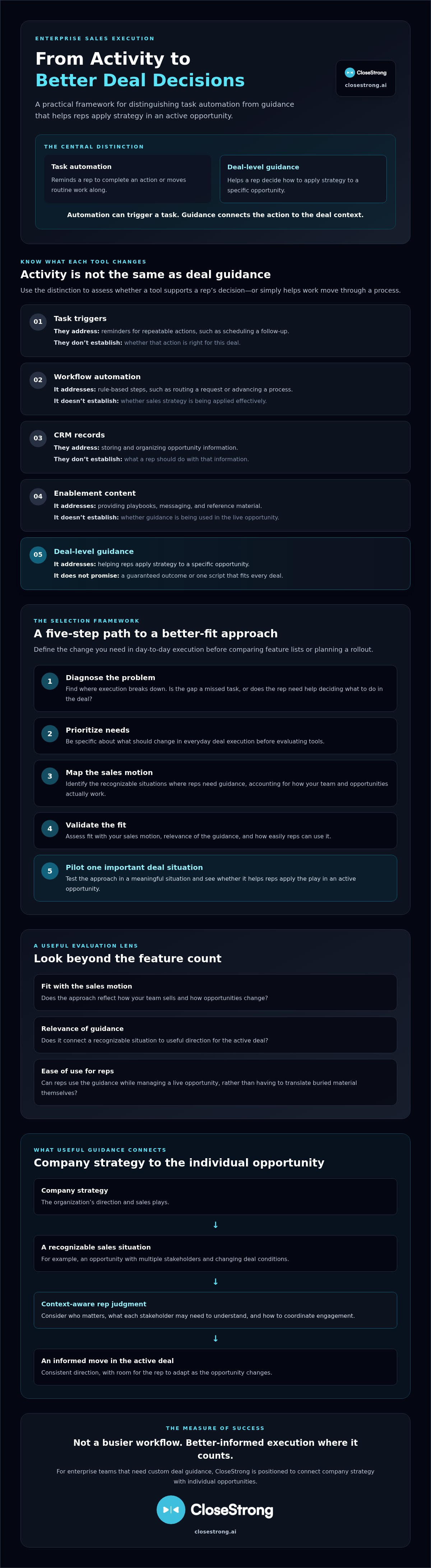
A tool won’t fix an unclear sales motion. Before comparing sales play automation tools, name the execution problem you want to solve, the people affected, and the deal situations where guidance should help. Then use a contained rollout to test whether the tool fits actual sales work, not just a polished demo.
Use this five-step process:
Describe where strategy stops translating into rep action. Be specific about the sales team and deal situations involved.
Separate must-have outcomes from optional features and familiar workflow preferences. Keep the buying criteria tied to the problem.
Outline the sales motion and the moments where reps need guidance. Identify who owns strategy, sales operations, frontline management, and adoption.
Ask vendors to demonstrate the defined use case and clarify setup, ownership, maintenance, and any integration requirements. Verify those details before making assumptions.
Test one defined play with a representative group and appropriately selected live opportunities before expanding to other situations.
Get the buying team aligned on what should change. Is the issue inconsistent execution in a particular deal situation, unclear guidance for reps, or difficulty for managers in assessing whether strategy is being applied? These are different needs. Record the must-have outcome for each one, then assign owners across sales strategy, operations, frontline leadership, and adoption. This prevents the evaluation from drifting into a feature-count contest.
For broader context on connecting corporate intent to what happens in active opportunities, read the enterprise sales execution platform guide.
Keep the pilot focused. Choose a defined play, a representative group, and opportunities that genuinely fit the situation the play is meant to address. Before rollout, agree on adoption and execution indicators. These might include whether reps can find and understand the guidance, whether they use it in relevant opportunities, and whether managers can assess its application. Set your own baseline and review criteria; don’t borrow an unsupported benchmark.
Collect feedback from both reps and managers. Where does the guidance help? Where does it create friction or fail to fit the deal? Review that feedback alongside the agreed indicators, then make a clear call: refine the play, expand the pilot, or stop. That discipline limits the risk of scaling a workflow before you know whether it supports real execution.
Teams focused on connecting company strategy to decisions on individual deals can review CloseStrong’s enterprise sales execution platform.
Some enterprise teams don’t need another system to prompt routine activity. They need a way to carry company strategy into decisions on individual opportunities. That’s the distinction to consider when comparing sales play automation tools: does the approach help reps apply guidance to real deal situations, or mainly organize tasks and content?
CloseStrong sells an enterprise sales execution platform using Precision Guided Selling™. Its purpose is to guide representatives through the closing process with custom, high-quality deal guidance. The focus is connecting company strategy to individual deals, not replacing every tool in a sales stack.
Consider it if your organization has a defined sales strategy but struggles to translate that strategy consistently across complex opportunities. The fit depends on the execution problem, not company size alone. Ask whether reps need guidance for specific deal situations and whether the current approach leaves them to interpret strategy on their own. For more category context, see Precision Guided Selling software and complex B2B sales software.
Be precise about what CloseStrong is and what it isn’t. It sells an enterprise sales execution platform. It does not sell CRM software, lead generation services, or sales training workshops. If your primary need is managing customer records, sourcing prospects, or delivering workshops, those are different requirements. Don’t buy an execution platform expecting it to solve a problem outside its stated purpose.
Start with your own strategy. Identify which sales strategies the platform needs to support and which deal situations call for guidance. Then confirm implementation requirements, integrations, security details, and commercial terms directly with CloseStrong. Those specifics need to be confirmed for your organization’s environment before making a decision.
The practical test is straightforward: can your team clearly describe where strategy breaks down, and would custom guidance help reps navigate that gap in active deals? If so, assess Precision Guided Selling for your execution needs. If the need is task management alone, keep evaluating against that requirement instead. The right choice should fit the work reps need to do, not just the category label on a vendor’s website.
The right sales play automation tools should do more than create reminders or move work through a workflow. They should fit your sales motion and help reps apply company strategy to the realities of individual deals. Start by defining the execution problem, evaluate demonstrated capabilities against it, and pilot a focused use case before expanding.
CloseStrong may fit enterprise teams looking for that connection between company strategy and deal execution. Its enterprise sales execution platform uses proprietary Precision Guided Selling™ technology to provide custom deal guidance for representatives. It’s an execution-focused option, not a substitute for CRM software, lead generation, or sales training workshops.
Ready to assess whether that approach matches your team’s needs? Explore CloseStrong’s enterprise sales execution platform. Define the change you want to see in real deals, then choose the approach that helps your team make it happen.
Sales play automation tools work by translating an organization’s defined sales plays into software-supported actions. Depending on the platform, that might mean workflow rules, prompts, or deal-level guidance that helps reps use a play during an opportunity. A reminder to schedule a follow-up automates a repeatable task; guidance helps a rep apply strategy to a specific deal. Capabilities vary, so ask vendors to demonstrate the actual workflow using a realistic scenario.
Sales engagement automation typically supports repeatable outreach, such as sequencing messages or prompting follow-ups. Sales play automation aims to operationalize a broader response to a sales situation, which may involve more than outreach. The boundary isn’t fixed, and products can overlap. Don’t choose based on a label alone. Define the execution need first, then verify through a realistic demonstration whether the tool supports it.
They can support more consistent execution when the plays are relevant, usable, and connected to real deal work. But software alone can’t guarantee that reps will change their behavior or that sales outcomes will improve. Start with one defined use case, agree on indicators tied to the execution problem, and pilot it with relevant opportunities. Review results and user feedback before deciding whether to refine or expand.
Start with the execution problem and the sales motion the team needs to support. Then assess whether guidance fits deal context, whether reps can use it in their work, and whether managers can evaluate execution. Ask about implementation needs and request a realistic demonstration. Compare sales play automation tools against the same criteria, involving sales leadership, operations, and frontline representatives so the choice reflects both strategy and day-to-day use.
Usually, these categories address different needs. A CRM generally manages customer and opportunity records, while sales play automation focuses on helping teams operationalize sales plays. Some products may have overlapping capabilities, so don’t assume a new tool replaces your CRM. Map the systems and workflows your team already uses, then ask vendors to verify specific capabilities and explain what would remain in your current CRM.
Agree on measures before rollout, combining adoption signals with indicators tied to the execution problem. For example, review whether reps use guidance in relevant opportunities and whether managers can assess how it was applied. Clicks and completed tasks show activity, not necessarily better execution or outcomes. Gather rep and manager feedback, inspect representative deal examples, and use what you learn to refine the play before expanding it.


