




A new sales tool doesn’t earn adoption because leadership says it’s important. It earns adoption when it helps a rep move a real deal forward. If you’re asking how to get sales team to adopt new tools, start with work reps already need to do, not another mandate or login target.The frustration is fa...
A new sales tool doesn’t earn adoption because leadership says it’s important. It earns adoption when it helps a rep move a real deal forward. If you’re asking how to get sales team to adopt new tools, start with work reps already need to do, not another mandate or login target.
The frustration is familiar: launch day brings activity, then usage fades. Reps see extra admin; leaders see logins but can’t tell whether the tool is improving execution. The fix isn’t louder reminders. It’s making the tool useful in the moments that matter, from preparing for a buyer conversation to deciding what a deal needs next.
This guide shows you how to connect adoption to specific sales problems, build repeatable behaviors beyond initial training, and measure meaningful use through deal-related actions. You’ll also see how guidance that bridges company strategy and individual deal execution can make tools more relevant to reps. The goal is to help new technology earn a place in how your team sells.
• Resistance can reveal workflow friction, such as duplicate entry or irrelevant prompts, not simply a lack of willingness to change.
• To learn how to get sales team to adopt new tools, identify a specific sales problem and fit the rollout around real rep workflows.
• Use a focused pilot and coaching in live deal situations to help useful behaviors continue after launch.
• Look beyond logins: assess repeated use, application in the sales process, and examples of how the tool informs deal decisions.
• Deal-relevant guidance can connect company strategy to rep decisions. CloseStrong’s Enterprise Sales Execution Platform uses Precision Guided Selling™ and custom deal guidance to support that connection.
Resistance can expose a workflow problem, not just a people problem. If reps say a tool slows them down, don’t rush to label them difficult or change-averse. First examine the work around the tool. Does it remove a real obstacle, or add another step to an already crowded sales process?
For leaders asking how to get sales team to adopt new tools, the useful question isn’t “How do we get everyone logged in?” It’s “What gets harder for reps when they use this?” Look for familiar friction signals:
reps must record the same deal information in more than one place.
the tool asks for input but doesn’t help with a decision or next step.
using it interrupts a familiar sequence of deal work.
recommendations arrive without fitting the opportunity in front of the rep.
These signals point to specific design and workflow questions. A Digital Adoption Platform can support users as they navigate software, but guidance through a screen can’t make an irrelevant task valuable. The tool still has to help with the sales work itself.
An announcement proves that a rollout was announced. A login count proves that someone accessed the system. Neither shows that a rep used it to prepare for a buyer conversation, respond to a deal risk, or choose a useful next move. Meaningful tool adoption is repeated use that improves relevant sales work. Measure that, rather than activity for activity’s sake.
“Not useful” can mean the interface is confusing, but it can also mean the task adds effort, arrives at the wrong moment, or offers no help on an active opportunity. Those are different problems and need different responses. Generic features lose credibility when they don’t address the deal in front of the rep.
Imagine a rep preparing for a customer call. A prompt asks for several fields that are already captured elsewhere, so the rep closes the tool and returns to call preparation. That’s not proof the rep refuses technology. It’s a signal to examine the workflow, timing, or value of the prompt.
Leaders can set expectations for how a tool should be used. But compliance can create visible activity without changing how reps qualify, prepare, or advance deals. Required logins and completed fields may satisfy a rollout checklist while leaving selling behavior untouched.
Enforced access says, “Use this because it’s required.” Practical value says, “Use this because it helps move this deal forward.” Expectations matter, but they stick when the tool supports a real decision or removes friction from a task reps already need to do. Start by examining the gap between the required action and the rep’s actual work.
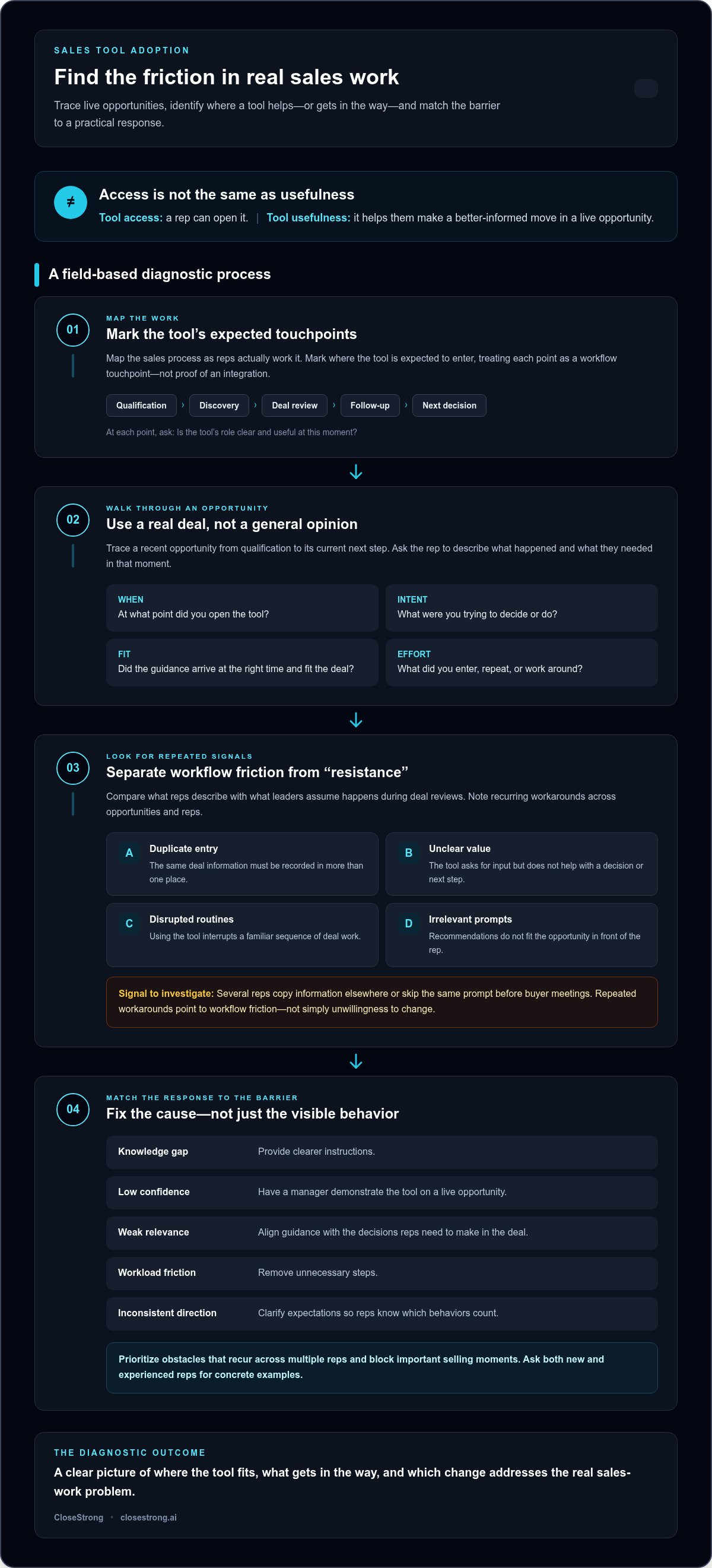
Don’t diagnose adoption from a dashboard alone. Map the sales process as reps actually work it, then mark where the tool is expected to enter: qualification, discovery, deal review, follow-up, or another decision point. Treat each as a workflow touchpoint, not proof of an integration. The goal is to determine whether the tool’s role is clear and useful at that moment.
Then compare the map with real opportunities. Ask reps to walk through what happened, rather than rate the tool in general. Questions like these surface specific friction:
• At what point in this opportunity did you open the tool?
• What were you trying to decide or do?
• Did its guidance arrive at the right time and fit the deal?
• What did you have to enter, repeat, or work around?
Tool access means a rep can open it; tool usefulness means it helps them make a better-informed move in a live opportunity. That distinction keeps the diagnosis focused on sales execution, rather than simply whether a feature exists or a user has signed in.
Trace a recent opportunity from qualification to its current next step. Note when the rep needed guidance, when the tool offered it, and what deal context was available. A prompt that appears before discovery may be premature; one that arrives after a deal review may be too late to shape the conversation.
Look for patterns across opportunities. If several reps copy information into another document before a review, or skip the same prompt before buyer meetings, record the workaround. Repeated workarounds point to workflow friction worth investigating, not isolated grumbling to dismiss.
Different barriers need different fixes. A knowledge gap may call for clearer instructions. Low confidence may require a manager to demonstrate the tool on a live opportunity. Weak relevance calls for better alignment with deal decisions; workload friction calls for removing unnecessary steps. Leadership expectations also matter: inconsistent direction can leave reps unsure which behaviors count.
Ask both new and experienced reps for concrete examples. One may struggle to find the right action; another may understand the tool but avoid it because the guidance doesn’t fit a complex deal. Compare their accounts with what leaders assume happens during deal reviews. Then prioritize obstacles that recur across multiple reps and block important selling moments.
This is a practical starting point for how to get sales team to adopt new tools: diagnose the work before prescribing a response. For teams looking to connect company strategy with decisions on individual opportunities, an enterprise sales execution platform with deal guidance can support that connection.
A rollout should change how a real sales task gets done, not add a software chore beside it. Before announcing the tool, define one specific problem it should help solve, such as preparing for a deal review with clearer next steps. Then build the rollout around that task. This five-step sequence keeps the focus on practical value:
Pick one sales moment where the tool should help, and describe the task reps need to complete.
Ask people who do that work to help test whether the proposed use fits their actual process.
Use a small, varied group to find friction and judge relevance, not to manufacture testimonials.
Help reps apply the tool to live sales tasks instead of delivering a detached tour of every feature.
Address what the pilot uncovered before extending the workflow to more of the team.
Keep the scope narrow enough to learn from. If the problem is inconsistent deal preparation, test how the tool supports preparation. Don’t widen the rollout to every sales activity at once or assume that the tool connects automatically to existing systems. Establish where reps will use it and what action they’ll take.
Choose participants with different experience levels and deal responsibilities, not just the most enthusiastic early adopters. Ask each person to apply the tool to current work and note where it helps, creates extra effort, or doesn’t fit the opportunity. Review observed use and specific obstacles, then revise the guidance or rollout materials. Positive reactions are useful, but they aren’t proof the workflow works.
Skip the feature parade. Break learning into short tasks tied to real selling situations, such as preparing a deal review or identifying a next step. Give managers a shared coaching prompt: ask what the rep is trying to accomplish, where the tool helped, and what remains unclear. That keeps coaching practical rather than turning every interaction into an inspection.
After the pilot, invite participants to share concrete lessons with peers: the task they tried, the step that worked, and the friction they encountered. Their examples make expansion more grounded than a generic announcement. For a broader view of connecting strategy with frontline execution, explore this sales execution platform overview.
The sequence matters: define the problem, test the workflow, support the behavior, then expand. That’s a practical foundation for how to get sales team to adopt new tools without confusing rollout activity with progress. CloseStrong’s enterprise sales execution platform uses Precision Guided Selling™ and custom deal guidance to connect company strategy with individual opportunities.
A login tells you a rep got through the door. It doesn’t tell you whether the tool helped with a real opportunity. Measure adoption in layers, from basic access to observed deal impact, and pair system activity with examples from reps and managers. The aim is to understand whether the tool is becoming part of useful sales behavior.
| Adoption stage | What to observe | What it can tell you |
|---|---|---|
| Access | Logins or task completion | Whether reps can reach and begin using the tool, not whether it helps. |
| Repeated use | Use across multiple relevant opportunities | Whether the behavior is recurring rather than launch-day activity. |
| Workflow application | Use at the intended point in the sales process | Whether reps apply the tool to the work it was meant to support. |
| Observed deal impact | Rep or manager examples of guidance informing an action | How the tool may contribute to deal execution, alongside other factors. |
Set a baseline before rollout using the behavior you expect to change. Review the same signals over time and look for direction, consistency, and differences between teams or deal types. Don’t impose a universal adoption threshold: a useful level of engagement depends on the task and how often that task occurs. Don’t credit a tool alone for changes in deal outcomes either. Buyer conditions, deal complexity, and other shifts matter too.
Logins and completion rates are access indicators. Repeated use at the intended workflow moment is stronger evidence of application. To understand usefulness, ask reps and managers to name an opportunity where the guidance informed a specific action. If they can describe the decision and why it mattered, the data has context. If they can only report that a field was completed, you’re still measuring activity.
Review activity and friction reports with frontline managers on a consistent cadence. Bring examples, not just totals: where did reps use the tool, where did they skip it, and what happened next? Assign an owner to resolve process questions and another to refine unclear guidance. Then check whether the adjustment changes behavior in later reviews. That loop turns measurement into operational improvement, instead of a scorecard that records problems and leaves them untouched.
CloseStrong’s enterprise sales execution platform provides custom deal guidance through Precision Guided Selling™. Explore how it connects company strategy with execution on individual opportunities.
A tool becomes part of how reps sell when it helps them act on company strategy in the deals they’re handling now. If guidance stays abstract, it competes with customer calls, deal reviews, and deadlines for attention. If it helps a rep think through a real opportunity, the tool has a reason to be used again.
That’s the difference between generic activity and useful execution. A rep can complete fields or open a resource without changing how they approach a buyer’s priorities. Deal-relevant guidance connects the company’s selling approach to a decision in front of the rep, making strategy more actionable when it matters.
Imagine a rep preparing for a deal review. A general checklist may remind them to update information, but custom guidance can help connect the company’s strategy to the questions this opportunity raises. What does the rep need to understand about the buyer? Which next step fits the deal’s current position? This example illustrates why guidance earns attention when it relates to the rep’s actual work.
CloseStrong’s Enterprise Sales Execution Platform is designed to bridge company strategy and individual deal execution. Its Precision Guided Selling™ technology provides custom deal guidance for sales representatives. Explore the Precision Guided Selling approach to see how tailored guidance can bring strategic direction closer to decisions reps face on individual opportunities.
Make the lessons from rollout operational. Diagnose friction in the work, pilot to test practical value, coach reps while they complete relevant tasks, then measure whether they apply the tool’s guidance in real opportunities. Keep the sequence intact. Expanding before addressing a recurring obstacle just spreads that obstacle to more people.
Set the goal as consistent execution, not software usage for its own sake. Revisit whether reps can use the guidance at the right point, whether managers can reinforce it in deal conversations, and whether the behavior supports the intended sales process. Those checks keep adoption connected to the work instead of turning it into a separate scorekeeping exercise.
That’s a more durable answer to how to get sales team to adopt new tools: connect the tool to decisions that matter in active deals, and make that value visible in everyday execution. The platform’s role is not to replace rep judgment, but to help translate company direction into relevant deal guidance.
See how CloseStrong guides deal execution with Precision Guided Selling™ and custom deal guidance for individual opportunities.
Choose one upcoming opportunity and ask a sharper question: what company strategy should guide the rep’s next decision, and what support would make that guidance useful in the moment? This turns adoption from a technology project into a practical test of how your team wants to execute. Start with the deal, then let the tool earn its place in the work.
That’s the real answer to how to get sales team to adopt new tools: make the connection between strategic intent and everyday selling visible to reps. When guidance speaks to the decisions they face, adoption has a purpose beyond compliance. It supports a more consistent way to move deals forward.
CloseStrong connects company strategy with execution on individual enterprise deals. Its Precision Guided Selling™ technology provides custom deal guidance for sales representatives. Explore CloseStrong’s enterprise sales execution platform to see how it brings strategy and deal guidance together. Start with a real opportunity and a clearer path from strategy to action.
No. A mandate can clarify which behaviors matter, but it may lead reps to complete required actions without using the tool to improve their work. Pair accountability with a visible benefit, such as making account preparation clearer, plus practical coaching and a way to share feedback. Leaders should set expectations, then check whether the required behavior helps reps handle real selling tasks.
Yes. Involve representatives with different experience levels and deal responsibilities, then have them test the tool on tasks they already perform. Ask for specific examples: Did it reduce effort preparing a customer meeting, create a duplicate step, or lack context for a complex opportunity? Rep input improves rollout decisions, but leaders still need to ensure the tool supports company priorities and the team’s sales process.
There’s no universal timeline. Adoption depends on the complexity of the work, how clearly the tool supports it, manager reinforcement, and how quickly obstacles are addressed. Review progress in stages: can reps access it, do they return to it, and are they applying it to relevant tasks? A fixed launch deadline can hide stalled behavior, so judge progress by sustained use, not the calendar alone.
Treat the drop-off as a signal to investigate, not an automatic cue to repeat the launch training. Check whether the tool still fits the task, whether its purpose is clear, and whether a new obstacle has appeared. Ask a rep to walk through a recent opportunity and show where use stopped. Address the recurring friction, then tell the team what changed so feedback leads to visible action.
Give everyone a shared foundation, then tailor practice to role, experience, and the tasks each person handles. A new rep may need to rehearse a basic workflow, while a veteran may only need to see how the tool supports a specific deal decision. For example, teach the whole team the common process, then use role-specific scenarios for follow-up. Skip features that don’t apply to their work.
Set a clear purpose and coach around decisions, not clicks. In a deal conversation, ask what the rep was trying to accomplish, whether the tool informed their next move, and what was still missing. Review patterns across the team to spot recurring barriers, while treating activity data as a starting point for discussion. That keeps accountability focused on useful execution instead of surveillance.
No. Adoption describes whether people use a tool; productivity reflects the quality and effectiveness of their work. Usage may support productivity if it helps a rep prepare more effectively or make a more relevant decision, but opening the tool alone proves little. Consider whether the tool is applied to its intended task, and interpret any change in deal outcomes alongside other factors, such as buyer priorities and opportunity complexity.


